

When you hear "AI workflow automation," what comes to mind? For many, it's just another tech buzzword. But what we're really talking about is a fundamental shift in how businesses operate, moving from simply doing tasks faster to doing them smarter.
Beyond The Buzzword: What AI Workflow Automation Really Means
Let's use an analogy. Think of traditional automation as a classic factory assembly line. Each station performs one specific, repetitive task based on a strict set of rules. It’s highly efficient but completely rigid. Any change requires someone to manually reconfigure the entire line.
Now, imagine a modern "smart" factory. This assembly line doesn't just put things together. It learns from its own mistakes, flags a machine for maintenance before it breaks down, and can even reconfigure itself to build a completely new product with minimal help. That leap—from a fixed, rule-following system to a flexible, intelligent one—is the essence of AI workflow automation.
It’s not just about getting a computer to follow a script. It's about injecting real intelligence into your operations. AI-powered systems learn from data, understand context, and make decisions on their own. This allows them to manage complex, end-to-end processes, not just isolated, simple tasks. It's a game-changer for operational efficiency.
The Feedback Loop Of Intelligent Operations
At its core, AI workflow automation is built on a continuous cycle of learning and improvement. It’s a simple but powerful idea: AI algorithms run tasks, those tasks generate performance data, and that data is fed right back into the system to make the algorithms even better next time.
This visual map illustrates how AI, the tasks it performs, and the data it generates are all connected in a self-improving loop.
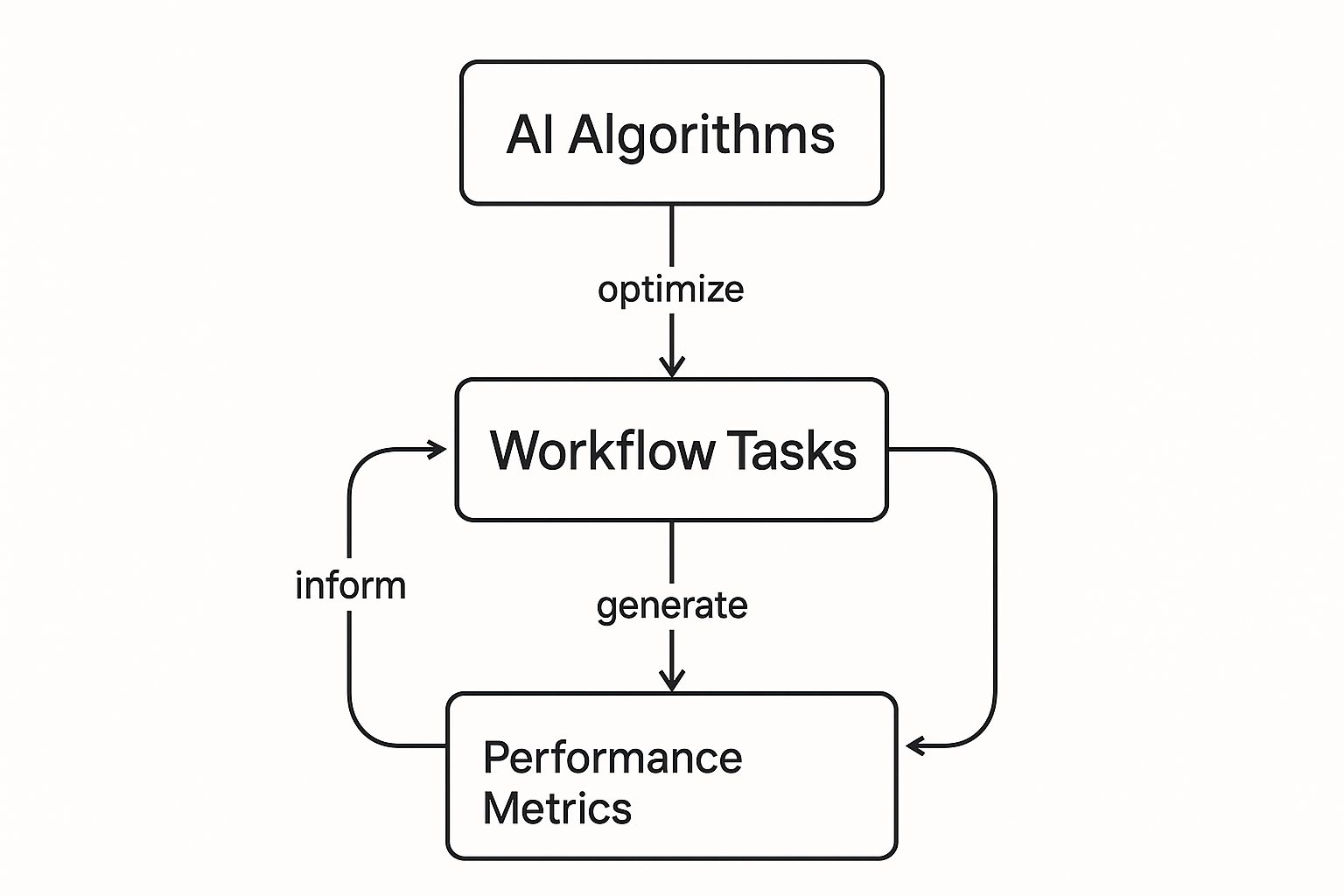
The key takeaway here is that the system isn't static. It's dynamic, constantly evolving, and designed to get smarter with every cycle. This adaptability is what truly sets it apart from older forms of automation and is the engine behind its massive business impact. The market growth we're seeing reflects this.
The global workflow automation market, which stood at around $21.51 billion in 2024, is expected to jump to nearly $37.45 billion by 2030. A huge chunk of that growth is fueled by AI, which allows for far more sophisticated and intelligent workflows than ever before. For a deeper dive, check out the market analysis from Mordor Intelligence.
From Simple Rules To Smart Decisions
To really get a feel for this shift, it helps to put the old and new side-by-side. Traditional automation is fantastic for predictable, high-volume tasks that never change. AI workflow automation, on the other hand, thrives where things are complex, messy, and unpredictable.
This table breaks down the core differences:
Traditional Automation vs AI-Powered Workflows
| Attribute | Traditional Workflow Automation | AI Workflow Automation |
|---|---|---|
| Decision-Making | Follows strict "if-this-then-that" rules. No gray areas. | Uses predictive models to make nuanced decisions based on data and context. |
| Adaptability | Rigid. Requires manual reprogramming if the process changes. | Learns and adapts on its own when it encounters new patterns or data. |
| Data Handling | Works best with structured data (e.g., spreadsheets, databases). | Can understand and process unstructured data like emails, images, and chat logs. |
| Scope | Best for automating simple, repetitive, isolated tasks. | Capable of managing complex, multi-step, end-to-end processes. |
| Error Handling | Stops or fails when an unexpected input or exception occurs. | Can often handle exceptions and unexpected scenarios intelligently. |
The ability to make sense of messy, unstructured data is a huge deal. It's what allows these systems to tackle real-world problems that older automation couldn't touch.
The real power of AI workflow automation lies in its ability to handle exceptions and unstructured data—the kind of unpredictable inputs that would halt a traditional system. It turns messy, real-world information into structured, actionable outcomes.
This capability is especially important as more businesses move their data and operations to the cloud. In fact, many of these advanced AI systems are built on cloud infrastructure. If you're interested, you can learn more about the synergy between cloud computing and data analytics, which truly forms the backbone of modern AI automation.
The Core Technologies Behind Smart Automation

To really get what makes AI workflow automation tick, we have to look under the hood. Imagine building a digital assistant for your business. You wouldn't just give it one skill, right? For it to be truly useful, it would need a brain, ears, a voice, and hands. This is exactly how AI automation works—by blending several key technologies into a single, cohesive system.
Each piece of the puzzle has a specific job, but it's how they work together that takes automation from basic task-doing to intelligent process management. Let’s break down these core pillars.
The Brain: Machine Learning
At the heart of any smart system is the ability to learn. That's where Machine Learning (ML) comes in. ML is the brain of the entire operation. It sifts through massive amounts of historical data to spot patterns, predict what’s next, and get better at its job over time without being explicitly reprogrammed.
Instead of just following a rigid set of rules, a workflow powered by ML can adapt on the fly. For instance, in an automated invoice processing system, ML can learn to recognize different invoice formats from all your vendors, even if it’s never encountered a specific layout before. With every invoice it processes, it gets smarter and more accurate.
This learning ability gives AI workflows their predictive muscle, allowing them to foresee potential bottlenecks or flag strange anomalies that a human might easily miss.
The Voice and Ears: Natural Language Processing
If Machine Learning is the brain, then Natural Language Processing (NLP) gives the system its senses—specifically, the ability to hear and speak. NLP is the technology that closes the gap between human language and computer logic, letting systems understand, interpret, and even generate text and speech.
This is a game-changer for automating any process that deals with unstructured data like emails, support tickets, or customer chat logs.
Think about a customer support workflow. An AI system with NLP can:
- Read and understand an incoming customer email to figure out what they need.
- Analyze the tone of the message to sense if the customer is happy, frustrated, or needs urgent help.
- Generate a relevant, human-sounding response to answer the question or just to let them know you're on it.
Without NLP, automation would be stuck dealing with neat, tidy data fields, leaving a mountain of valuable business communication on the table.
An AI workflow combines technologies to create a system greater than the sum of its parts. ML provides the intelligence, NLP handles communication, and RPA executes the tasks, turning complex, manual processes into streamlined, autonomous operations.
This combination is what unlocks true end-to-end automation, achieving far more than any single technology could on its own.
The Hands: Robotic Process Automation
Okay, so the system has made a decision and understood the context. Now what? Someone—or something—has to actually do the work. This is where Robotic Process Automation (RPA) steps in, acting as the system’s digital hands.
RPA is brilliant at handling repetitive, rules-based tasks across different applications. Picture a software bot that can log into a CRM, copy-paste data between spreadsheets, fill out web forms, and move files around, just like a person would. The difference? It’s much faster and never makes a typo.
When you add AI into the mix, RPA becomes incredibly powerful. Instead of just mindlessly following a script, "intelligent RPA" can handle curveballs and make decisions guided by its ML brain. For example, if an automated process hits an unexpected error, it can use ML to figure out the next best action instead of just freezing up and waiting for a human to fix it. This makes the entire AI workflow automation system more resilient and truly autonomous.
The Real-World Payoff of AI Automation
Let's move past the theory. The true value of AI workflow automation isn't in the buzzwords; it's in the tangible results companies are seeing every day. Businesses aren't just adopting this technology because it's new—they're winning with it because it delivers a measurable impact that ripples across the entire organization.
Imagine a busy logistics company constantly putting out fires caused by shipping errors and unexpected delays. By introducing an AI workflow, they can shift from being reactive to proactive. The system can analyze historical shipping data, weather patterns, and even global news to flag potential supply chain disruptions before they even happen. It can then automatically reroute shipments, alert customers about possible delays, and adjust inventory levels in real-time.
This isn't just about moving faster. It's about building operational resilience and fiercely protecting the customer experience.
Driving Radical Efficiency and Cost Savings
One of the first and most obvious wins from AI automation is a massive boost in operational efficiency. It's designed to take over the repetitive, soul-crushing tasks that eat up your team's day, freeing them to focus on the strategic work that actually requires a human brain—creativity, critical thinking, and problem-solving. This shift doesn't just make processes faster; it makes them smarter and far more cost-effective.
Take a marketing team trying to personalize campaigns for thousands of customers. Manually sifting through customer behavior to create unique journeys is a non-starter at scale. But an AI workflow can handle the entire process effortlessly.
- It dives into browsing history, purchase data, and engagement metrics.
- It sorts audiences into tiny, hyper-specific groups based on their predicted interests.
- It automatically triggers personalized email and ad campaigns tailored to each group.
The outcome? A much higher return on investment and a more engaged customer base, all without having to hire an army of marketers or burn out your current team with manual grunt work. This is how AI automation translates directly into lower costs and higher revenue.
Improving Life for Employees and Customers
Here's a simple truth: happy employees create happy customers. And AI workflow automation is a fantastic tool for improving the experience on both sides of that equation. By stamping out tedious administrative tasks, it tackles a major source of workplace frustration head-on. The data backs this up in a big way.
By 2025, AI-powered workflow automation is expected to become a standard for business process optimization. Research shows it boosts productivity for 66% of knowledge workers and improves job satisfaction for a whopping 90% of them by cutting down on repetitive tasks.
It's no surprise, then, that 83% of IT leaders view workflow automation as fundamental to their digital transformation efforts. It's a cornerstone for building modern, agile, and people-first operations. You can dig deeper into these trends by exploring the insights on future-proofing businesses with AI workflows at Superagi.com.
This newfound job satisfaction stems from empowering people to do more meaningful work. When AI handles the repetitive stuff, your team can pour their energy into solving complex problems, innovating, and building stronger relationships with customers—the very activities that create real business value and personal fulfillment. At the same time, your customers get faster service, more relevant interactions, and fewer errors, which builds loyalty and keeps them coming back.
Enabling Data-Driven Strategic Decisions
Finally, one of the most powerful—and often overlooked—benefits of AI workflow automation is the treasure trove of data it unlocks. Every automated process becomes a clean, structured source of performance data. This gives you an unprecedented, real-time look at how your business is actually operating under the hood.
Instead of relying on gut feelings or month-old reports, leaders can finally make decisions based on cold, hard evidence.
Actionable Insights from AI Workflows
| Data Point | Strategic Question Answered |
|---|---|
| Process Cycle Time | Where are the bottlenecks slowing us down? |
| Error Rates | Which steps in our process are most likely to fail? |
| Resource Allocation | Are we using our people and tools in the smartest way? |
| Customer Behavior | What do our most valuable customers really want from us? |
This creates a continuous feedback loop that drives constant improvement. You can pinpoint inefficiencies with surgical precision, test out new ideas, and measure the impact almost instantly. It transforms your operations from a static rulebook into a dynamic, intelligent system that learns and gets better over time, forging a powerful and sustainable competitive advantage.
How Different Industries Use AI Workflows

The real magic of AI workflow automation isn’t some abstract concept; it's what happens when businesses apply it to solve their nagging, industry-specific problems. You truly see its value when you look at how different sectors are using it to tackle unique, everyday challenges.
From protecting financial transactions to crafting one-of-a-kind marketing campaigns, these intelligent workflows are fundamentally changing how work gets done. Let's look at a few real-world examples to see how this technology is delivering real, measurable results.
Finance: Real-Time Fraud Detection
The world of finance runs on trust and speed, making it a perfect fit for intelligent automation. The constant shadow looming over it is fraud, where every single second is critical.
The Problem: A major credit card company was wrestling with an outdated fraud detection system. It was built on a rigid, rules-based engine that kept flagging legitimate customer purchases—a surefire way to frustrate loyal cardholders. Worse, it was too slow to catch sophisticated fraud rings, costing the company a fortune.
The AI Workflow Solution: They switched to an AI workflow automation system that uses machine learning to analyze transaction data as it happens.
- The workflow pulls in millions of data points every second—transaction size, merchant location, purchase type, and the customer's own spending history.
- An ML model continuously learns what "normal" looks like for each customer, even adapting to things like a vacation or a change in shopping habits.
- If a transaction deviates from that learned pattern, the workflow instantly flags it as high-risk. It can then trigger an automated response, like shooting a verification text to the customer’s phone.
The Measurable Outcome: The new system cut false positives by a staggering 40%, which dramatically improved the customer experience. Even better, it boosted the detection of actual fraud by 25%, saving the company millions of dollars each year.
Human Resources: Streamlined Employee Onboarding
HR departments are often drowning in paperwork and administrative tasks, especially when it comes to onboarding new hires. A clunky, slow onboarding process can sour a new employee’s experience and tank productivity right from the start.
The Problem: A fast-growing tech company realized its manual onboarding was a mess—it was slow, inconsistent, and full of errors. HR and IT teams were bogged down with the same repetitive tasks for every new hire, from sending out paperwork to creating system accounts and ordering equipment. New employees were often left waiting for days just to get the tools they needed to do their jobs.
The AI Workflow Solution: The company brought in an AI-powered assistant to manage the entire onboarding journey.
- Trigger: The moment a candidate signs their offer letter in the HR platform, the workflow springs into action.
- Action: The AI assistant immediately sends a welcome email with digital forms, creates accounts in essential systems like Workday and Salesforce, and automatically places an order for a new laptop and monitor with the IT team.
- Communication: Throughout the process, the system keeps the new hire, their manager, and HR in the loop with automated updates, so everyone knows exactly what's happening.
The Measurable Outcome: The company slashed the average onboarding time from five business days down to just four hours. This freed up the HR team to work on more valuable initiatives, like company culture and employee development, while ensuring every new hire had a smooth and positive first day.
AI workflow automation is fundamentally changing business operations by adding intelligence and adaptability to complex processes. Unlike legacy systems, it uses machine learning and advanced analytics to seamlessly manage thousands of workflows across entire departments. This allows businesses to proactively resolve issues, optimize resources, and boost overall productivity. You can explore how agentic AI drives this end-to-end automation in this insightful article from Moveworks.
Marketing: Personalized Customer Journeys
In marketing, personalization is the name of the game. But creating a truly unique experience for every customer is a task that’s simply impossible to do manually when you're operating at scale.
The Problem: An e-commerce brand was tired of sending generic, one-size-fits-all email blasts. They knew that customers who got relevant, timely messages were far more likely to make a purchase, but their marketing team just didn’t have the time or resources to build and manage thousands of individual customer journeys.
The AI Workflow Solution: They connected an AI workflow automation platform to their customer data platform (CDP). This new workflow analyzes user behavior in real-time—things like which product pages they visit, what they add to their cart, and their purchase history. Based on these actions, it automatically triggers hyper-personalized email campaigns. For instance, if a customer looks at hiking boots but leaves without buying, the workflow might wait a day and then send them an email with a helpful guide on how to choose the right pair.
The Measurable Outcome: This automated, personal touch led to a 30% increase in email open rates and a 15% lift in conversion rates from their email campaigns. The marketing team was finally able to deliver true one-to-one marketing without needing to hire more people.
Your Implementation Roadmap
Bringing AI workflow automation into your company might feel like a huge project, but it doesn't have to be a headache. The secret is to take a structured, practical approach that builds momentum and shows value every step of the way. This is your blueprint for a smooth launch, guiding you from a simple idea to a fully functioning and monitored AI workflow.
Think of this as a series of deliberate steps, not one giant leap. Each step builds on the last, making sure you end up with a solution that solves a real business problem and fits neatly into how you already work. Following this roadmap will help you sidestep common traps and position your team for a successful, scalable automation strategy.
Step 1: Identify High-Impact Processes
Before you even glance at a tool or write a line of code, your first job is to find the right problem to solve. The best place to start with AI workflow automation is a process that's both high-impact and not overly complex. You're hunting for that sweet spot where automation can make a huge difference without getting bogged down in a months-long development cycle.
Start by mapping out your current workflows and searching for the obvious pain points.
- Repetitive and Time-Consuming Tasks: What activities are stealing your team's precious hours every day? This could be anything from data entry and report generation to routing customer support tickets.
- High Error Rates: Where do manual mistakes pop up most often? Automating these areas can seriously boost accuracy and consistency.
- Process Bottlenecks: Where do tasks get stuck, just waiting for someone to manually approve or handle them? These are perfect candidates for streamlining.
Once you have a list of potential targets, it's time to evaluate them. A great first project is one where the benefits are crystal clear and easy to measure. This helps you build a strong business case and get enthusiastic buy-in from stakeholders for whatever comes next. This initial step is foundational to a solid automation strategy, much like creating a broader digital transformation roadmap is for the entire business.
Step 2: Select the Right Tools
With a clear use case in hand, you can now start looking for the right tools for the job. The market is packed with platforms for AI workflow automation, each with its own strengths. Your mission is to find a solution that aligns with your specific needs, your team's technical skills, and your budget.
Keep these key factors in mind as you weigh your options:
- Integration Capabilities: How well does the tool play with your existing systems, like your CRM, ERP, or HR platform? Look for platforms with plenty of pre-built connectors or a solid API. For example, some modern AI assistants now offer over 50 action integrations with popular apps like Salesforce and Microsoft Teams right out of the box.
- Ease of Use: Is the platform built for business users with a simple drag-and-drop interface, or will you need dedicated developers to make it work? Some newer tools even let you describe a workflow in plain English to get a working template.
- Scalability: Can this tool grow with you? Make sure the platform you choose can handle more complex workflows and a higher volume of tasks as your business and automation needs expand.
The most effective approach is to create a balanced automation ecosystem. This might mean using a simple RPA tool for basic tasks while deploying a more advanced AI assistant for complex, decision-based workflows.
Step 3: Design and Deploy Your Workflow
This is where the rubber meets the road and your idea becomes reality. Using your chosen platform, you’ll start designing the logic of your automated process. The best way to do this is with a pilot program—a small-scale version of the workflow that you can test and tweak in a controlled environment.
Your design process should follow these steps:
- Map the Process: Create a simple flowchart of the workflow. Detail every step, decision point, and system it needs to touch.
- Build and Configure: Use the platform's interface to actually build the automation, connecting your apps and setting up the AI models.
- Test Thoroughly: Run the workflow through its paces with different test scenarios. Don't forget to include edge cases and potential errors to make sure it handles everything correctly.
- Deploy and Monitor: Once you're confident in the pilot, roll the workflow out to a small group of users. Set up a dashboard to track key performance indicators (KPIs) like processing time, error rates, and cost savings. This data is pure gold for proving ROI and finding new ways to make the workflow even better.
Best Practices for Long-Term Success
Getting your first AI workflow automation project off the ground is a huge step. But the real win isn’t just that initial launch; it's about building a sustainable, scalable automation culture that keeps delivering value for years to come.
True success means weaving intelligent automation into the very fabric of your company. This takes more than just technical know-how. It requires a strategic mindset and a solid commitment to practices that look beyond the first implementation, turning a single project into a full-fledged, value-generating program.
Start with a Focused Pilot Project
The surest way to build momentum is to start small and score a quick, decisive win. Resist the temptation to boil the ocean by automating a massive, company-wide process from day one. Instead, pick a focused pilot project.
Zero in on a workflow that’s a well-known pain point but is simple enough to automate successfully within a reasonable timeframe. This approach is powerful for a few reasons:
- It Demonstrates ROI: A successful pilot gives you hard data on efficiency gains and cost savings. This makes it much easier to get buy-in from leadership for bigger projects down the road.
- It Builds Experience: Your team gets to learn the ropes in a low-risk environment. They’ll figure out what works and what doesn't, gathering crucial insights for more complex challenges later.
- It Creates Champions: The team that nails the pilot becomes your internal fan club. They've seen the benefits firsthand and can share their positive experience, turning skeptics into supporters.
Prioritize Data Governance and Quality
Let’s be blunt: your AI workflows are only as good as the data you feed them. Think of data as the fuel for your automation engine. If you pour in dirty fuel, the engine is going to sputter, stall, and ultimately fail.
A key to long-term success is establishing robust data governance from day one. AI systems are only as good as the data they learn from. Inaccurate or inconsistent data will lead to flawed decisions and unreliable workflows, undermining the entire initiative.
Before you even think about automating a process, you have to get your data house in order. This means establishing clear data governance policies—defining who owns what data, how it should be formatted, and what security measures are needed to protect it.
For most companies, this involves creating clean, reliable pathways for information to flow between systems. We cover this in detail in our guide to automating data pipelines. Investing in data quality isn't an optional step; it's a non-negotiable prerequisite for building automated processes that people can actually trust.
Champion Change and Involve Employees
Technology doesn't create change on its own—people do. One of the biggest hurdles to long-term automation success isn’t the tech, but employee resistance. This often comes from a natural fear of being replaced.
To get ahead of this, you need to manage the human side of the transition with care. Be completely transparent about your goals. Frame AI workflow automation as a tool that augments human capabilities, not one that replaces them.
Emphasize how automation will take over the tedious, repetitive tasks, freeing people up to focus on more strategic, creative, and satisfying work. Better yet, involve them from the very beginning. Ask your teams which workflows are the most frustrating and ripe for improvement. This simple act turns them from passive observers into active participants, creating a sense of ownership that is critical for success.
Common Questions About AI Automation
Whenever a powerful new technology emerges, it’s natural for business leaders to have questions. Getting clear, straightforward answers is the first step toward making confident decisions. Let's tackle some of the most common questions we hear about AI workflow automation.
One of the biggest points of confusion is how this differs from traditional Robotic Process Automation (RPA). The easiest way to think about it is with an analogy. A standard RPA bot is like a worker on a fixed assembly line—it does one repetitive task over and over, perfectly. An AI-powered workflow is the factory manager who oversees the entire production line, makes smart decisions when something unexpected pops up, and even figures out how to make the whole process run better.
The real difference is intelligence. RPA is great at following predefined rules. AI workflow automation goes a step further by interpreting data, understanding context, and making adaptive decisions to manage a process from start to finish.
Is This Technology Only for Large Enterprises?
There’s a common myth that AI automation is only for massive corporations with deep pockets. While big companies were definitely the first to jump in, that’s no longer the case. The technology has become far more accessible and scalable.
Modern platforms now offer flexible pricing and low-code interfaces, which means small and medium-sized businesses (SMBs) can automate key processes without needing an army of data scientists. An SMB can start small by automating a single, high-impact workflow—like invoice processing or customer service tickets—and see a real return on investment almost immediately.
What Are the Biggest Implementation Challenges?
Getting any new system up and running comes with its share of hurdles. For AI workflow automation, the challenges usually boil down to three things:
- Data Quality: AI systems are only as smart as the data they learn from. If your data is messy, incomplete, or locked away in different silos, your automation will be unreliable at best.
- System Integration: You need to connect the AI platform to all your other business tools, like your CRM or ERP. This can get technically complex depending on your existing tech stack.
- Skill Gaps: Your team will likely need some new skills to design, manage, and fine-tune these intelligent workflows effectively.
The key is to get ahead of these issues. A solid data governance strategy, a clear integration roadmap, and a plan for upskilling your team will make the entire rollout much smoother.
Ready to dive deeper into the world of intelligent systems? The experts at DATA-NIZANT break down the latest in AI, data science, and digital infrastructure to help you stay ahead. Explore our in-depth articles at https://www.datanizant.com.